Masuk ke dashboard server kamu, lalu:
- Buka menu Schedule
- Klik New Schedule

2. Buat Cron Schedule
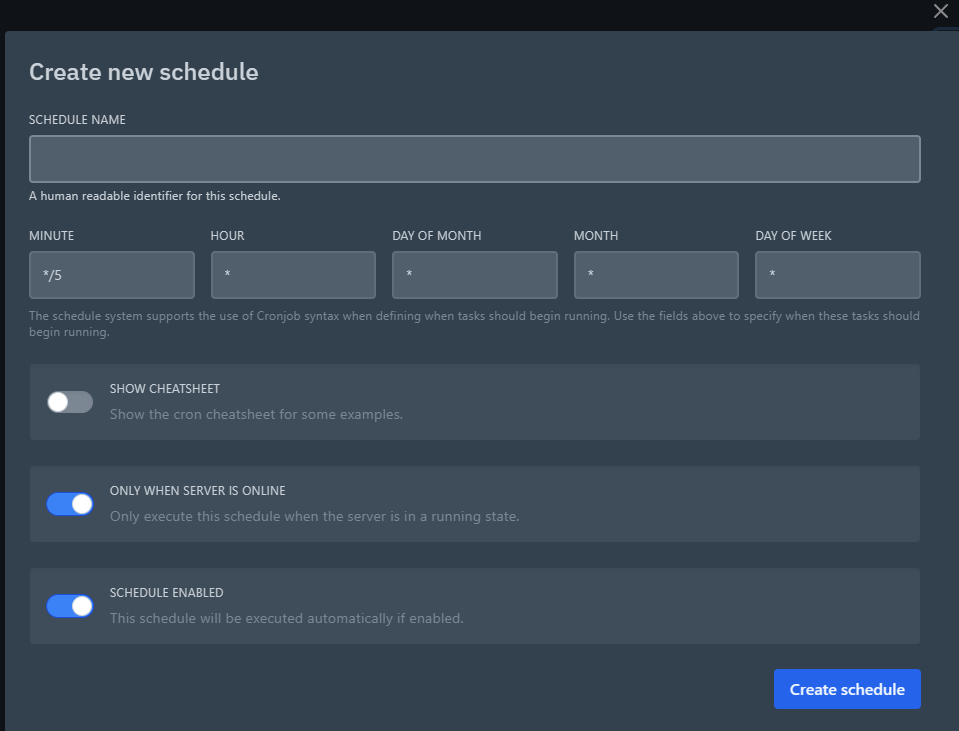
Isi konfigurasi schedule sesuai kebutuhan:
- Name: Nama schedule (contoh: Auto Restart)
- Minute / Hour / Day / Month / Day of Week: Atur waktu cron
- Task: Tambahkan task seperti:
command → menjalankan perintahpower → restart / stop / start server
Contoh:
- Restart server setiap hari jam 04:00
- Menjalankan command tertentu secara berkala
Tips 💡
- Gunakan schedule untuk auto restart server agar performa tetap stabil
- Jangan terlalu sering menjalankan cron agar tidak membebani server
- Pastikan timezone server sudah sesuai
Selesai 🎉
Schedule berhasil dibuat dan akan berjalan otomatis sesuai waktu yang kamu tentukan,.Last modified on April 27, 2026
