> ## Documentation Index
> Fetch the complete documentation index at: https://sensei.aisbirnusantara.com/llms.txt
> Use this file to discover all available pages before exploring further.
# How to Create Schedules & Cronjobs
> Guide to automating tasks and server restarts using the Pterodactyl Schedule manager
***
### 1. Navigate to Schedules
In your server dashboard:
* Open the **Schedules** menu.
* Click **New Schedule**.

***
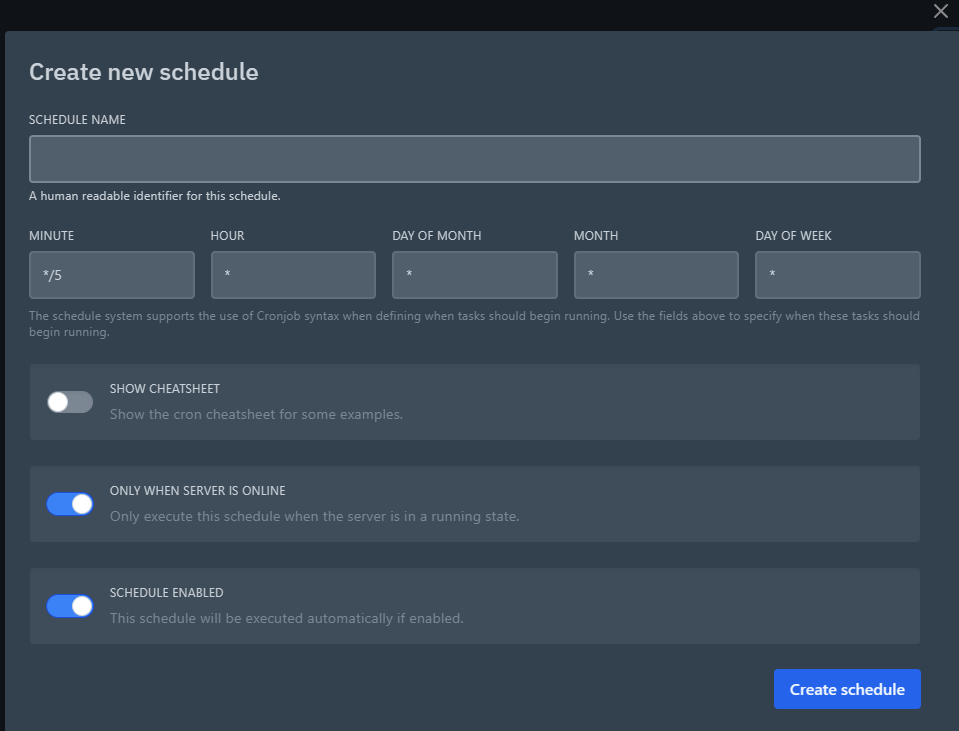
### 2. Configure Cron Expression
Configure the schedule settings:
* **Schedule Name**: Name identifier (e.g. `Daily Auto Restart`).
* **Minute / Hour / Day of Month / Month / Day of Week**: Standard cron parameters (e.g. `0 4 * * *` for daily 04:00 AM restart).
* **Tasks**: Add actions such as:
* `Power Action` → Restart / Stop / Start server
* `Send Command` → Execute console commands
***
## Best Practices 💡
* Use schedules for daily automatic restarts to keep memory utilization optimized.
* Avoid setting cron intervals too short (e.g. every minute) to prevent unnecessary server strain.